For people who turn off the alarm and fall back asleep

Don't just stop the alarm.
Get out of bed.

Albori makes you complete one verified wake-up task—then checks that you stayed up.

No snooze · On-device verification · iOS 26 or later

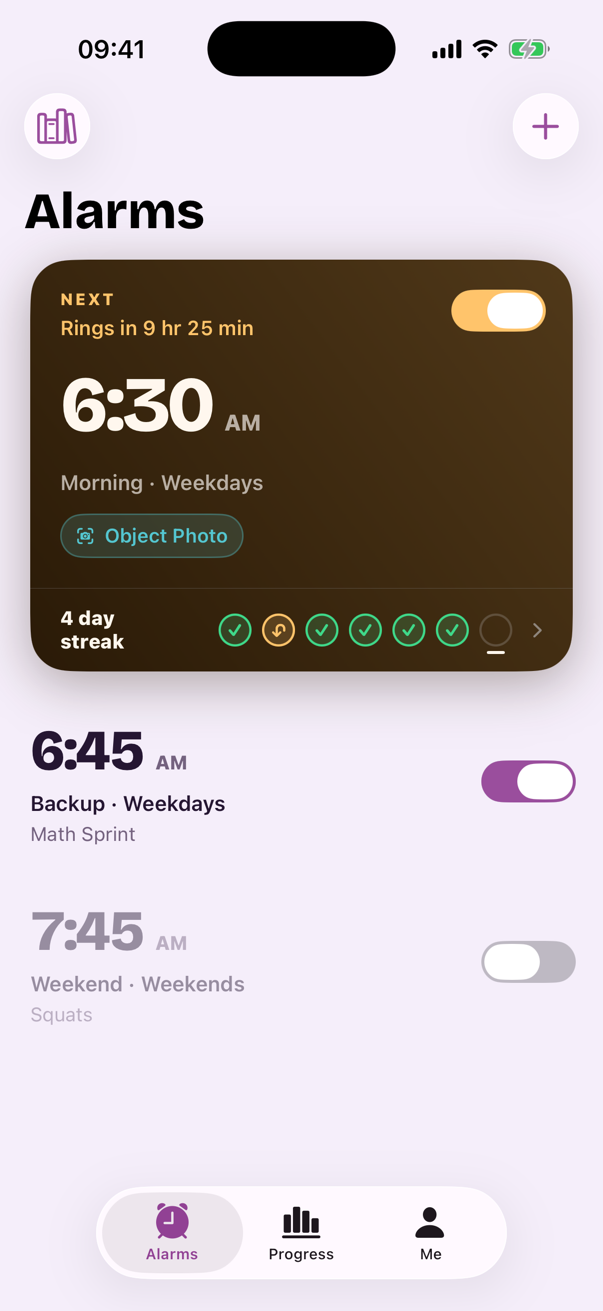
Albori showing a 6:30 AM alarm with an Object Photo wake-up task
One alarm, one verified taskNo snooze buttonOptional stay-up checkCamera frames stay on your iPhone

The real problem

Your alarm rang. You turned it off. Then you woke up late.

A louder sound still gives a half-asleep brain the same easy exit. Albori replaces that exit with a small action you chose while fully awake.

  1. 06:30It ringsYour alarm does its job.
  2. 06:31You tap StopYour body never leaves the bed.
  3. 08:47You wake up twiceThis is the moment Albori is built to prevent.

How Albori gets you up

Three moments. One morning that actually starts.

01

Choose one task tonight

Pair the alarm with the action most likely to wake your brain or move your body.
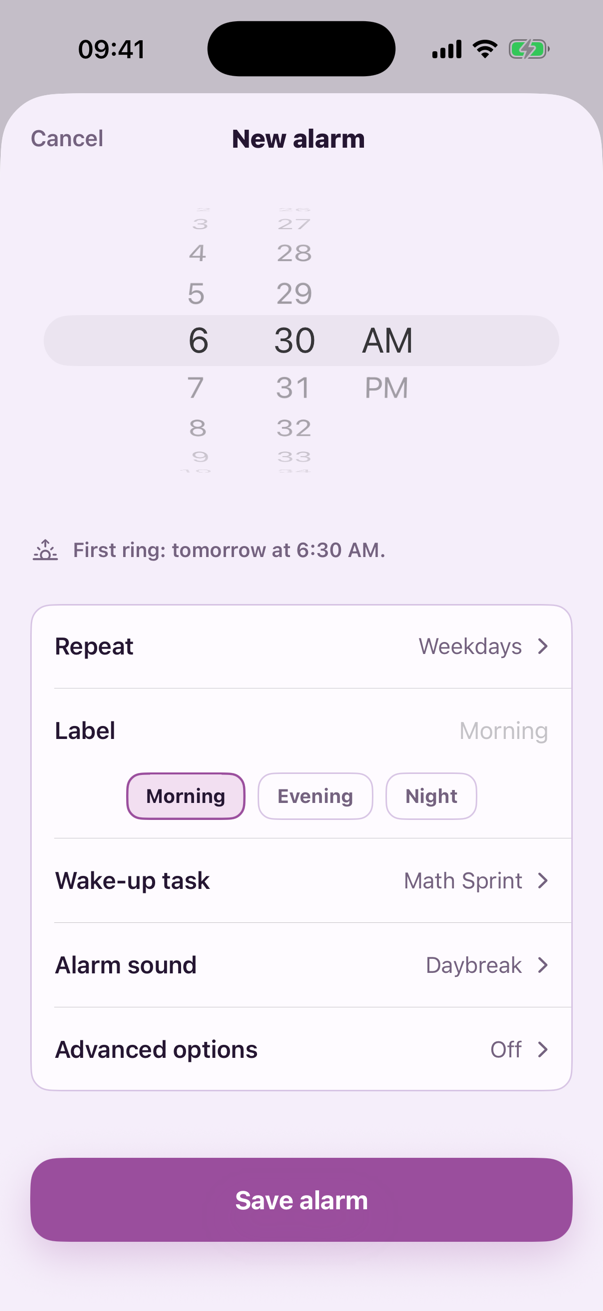
New alarm screen with time, repeat, wake-up task, alarm sound, and advanced options
02

Finish it to stop the alarm

Wake Mode gives you one clear task. No snooze, tabs, settings, or back button.
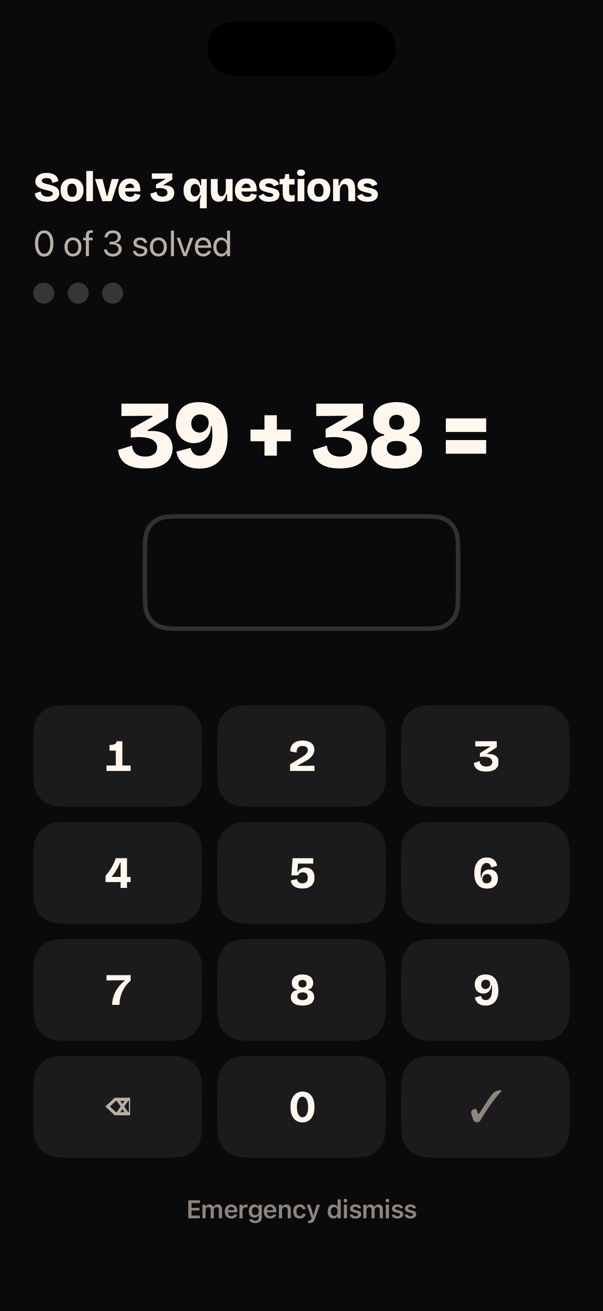
Math Sprint in dark Wake Mode with a large equation and keypad
03

Prove you stayed up

Add an optional wake check after the task. If you went back to bed, your morning is not quietly counted as complete.
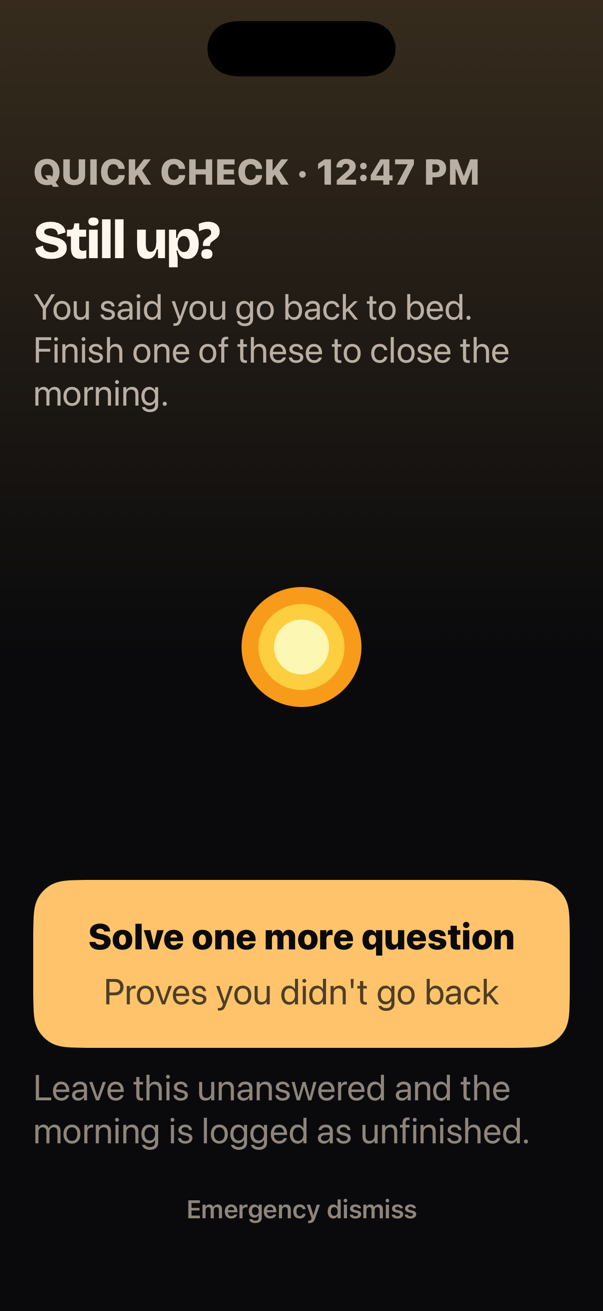
Albori asking Still up and offering one more wake-up question

Pick what gets you moving

Four tasks. Four ways to leave sleep behind.

Every task checks something real. If a camera task cannot run, Albori offers Math Sprint as a direct fallback so the alarm never traps you.

Object Photo

Leave the bedroom · 30–60 sec

Find and photograph the everyday object Albori names.

Verified by live, on-device image recognition.

Squats

Move your body · about 1 min

Complete ten full reps while your iPhone counts the motion.

Verified by on-device pose movement across frames.

Push-ups

High effort · about 90 sec

Do eight focused reps and get your whole body involved.

Verified by on-device pose movement across frames.

Math Sprint

Wake your brain · about 45 sec

Solve three arithmetic questions on a keypad built for sleepy eyes.

Verified by correct answers with adaptive difficulty.

Your camera stays private. Frames are processed on your iPhone and are never stored or uploaded.

Wake Mode

No snooze. No distractions. One way forward.

At 6:30, more options are not helpful. Wake Mode makes the next action obvious even when your brain is barely online.

  • ✓One task fills the screen.No tabs, navigation, or settings during the alarm.
  • ✓Large, high-contrast controls.Built to be read with one eye open.
  • ✓No snooze affordance.A ten-second Emergency Dismiss remains for genuine emergencies.

Solve 3 questions · 1 of 3 solved

39 + 38 =

Emergency dismiss

Quick wake check asking whether the user is still up

The second half of waking up

Stopping the alarm is easy. Staying up is the job.

Choose a quick check or a stronger camera task after the alarm. Albori does not declare victory at the exact moment you are most likely to crawl back under the covers.
Quick checkOne more question to close the morning.
Strong checkA camera-verified action away from bed.
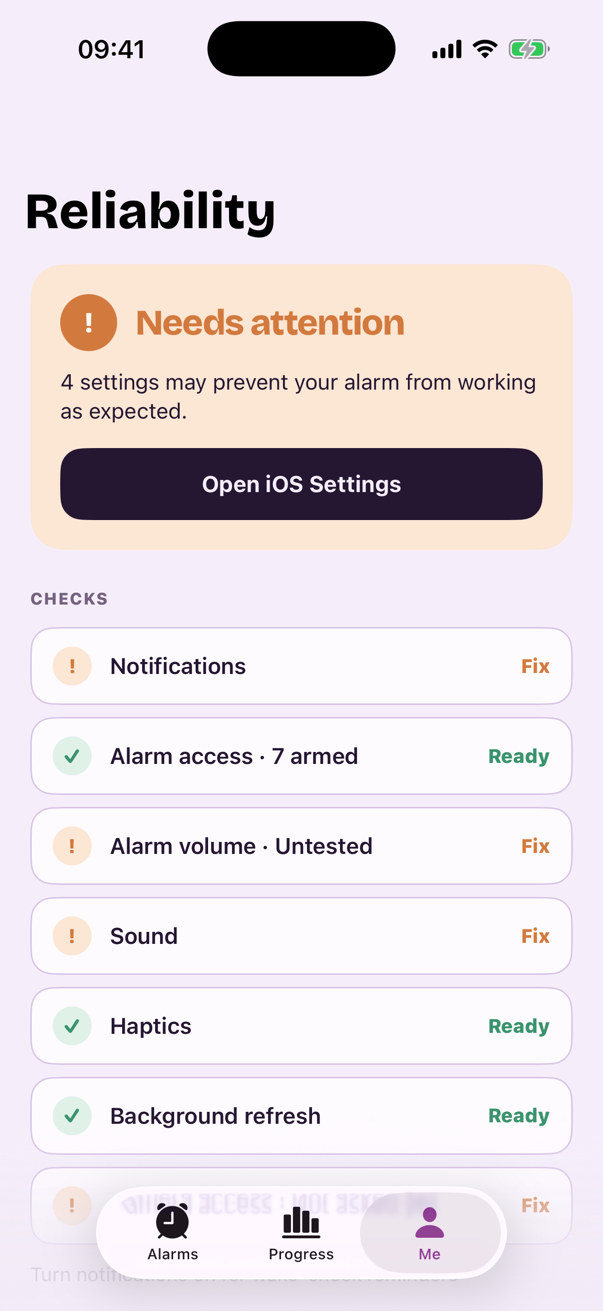
Albori Reliability Center listing settings that are ready and those needing attention

Trust tomorrow morning

Know your alarm is ready before you sleep.

Reliability Center checks the iPhone settings that can affect the next alarm and tells you exactly what needs attention.

  • Alarm access and notifications
  • Alarm volume, sound, and haptics
  • Connected headphones or speakers
  • Camera access for verified tasks

Choose your sound, too. Daybreak, marimba, music box, and piano tones make the alarm familiar without making setup complicated.
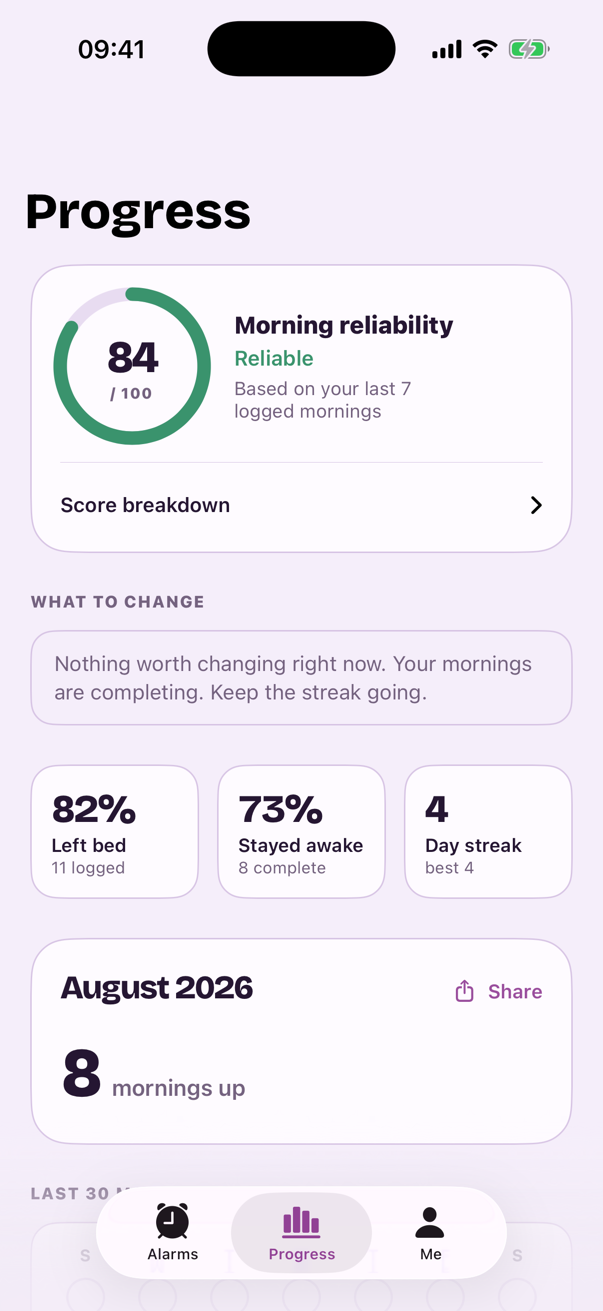
Albori Progress showing reliability, stayed-awake rate, streak, and monthly recap

Progress + Monthly Recap

See mornings getting easier.

Albori tracks the outcomes that matter: whether you finished, left bed, stayed awake, and met your target time.

84Morning reliability
8Mornings up this month

Example data shown from the in-app demo record. Your recap is calculated from your own logged mornings.

A trial with no mystery

See what happens before you start.

Albori is a subscription app. Weekly includes a 3-day free trial for eligible customers. Annual has no trial.

1Today

Everything unlocks. Your first alarm can be armed.

2Day 2

Albori reminds you the trial ends tomorrow.

3Day 3

First charge: $3.99 per week unless you cancel first.

Weekly

$3.99 / week

3-day free trial for eligible customers

  • All alarms and verified missions
  • Wake Check, Reliability, and Progress
  • Cancel in your Apple Account
Start with the trial
Save 80%

Annual

$39.99 / year

About $0.77 a week. No trial on this plan.

  • All alarms and verified missions
  • Wake Check, Reliability, and Progress
  • Cancel in your Apple Account
Choose Annual

Prices shown in US dollars. The App Store shows the exact local price, renewal date, and total before confirmation. Subscriptions renew automatically unless cancelled at least 24 hours before the current period ends.

Albori app icon

Coming to the App Store

Make tomorrow morning different.

Set one alarm. Pick one verified task. Give your half-asleep self a better way forward.

Get notified at launchRequires iOS 26 or later

Questions, answered plainly

Before you trust it with tomorrow morning.

What if I turn off my alarm and fall back asleep?
That is the problem Albori is designed around. The alarm stops after a task you chose in advance. An optional wake check follows and asks you to prove you are still up.
How are the camera missions verified?
Object Photo uses live image recognition. Squats and Push-ups use body pose across frames. All processing happens on your iPhone; camera frames are never stored or uploaded. Read the privacy policy →
Is there really no snooze button?
There is no snooze button, setting, or hidden gesture. A deliberate ten-second Emergency Dismiss remains for genuine emergencies; using it ends the streak and records the morning as unfinished.
What if a task cannot be verified?
Albori never traps you. If a camera mission cannot run or fails repeatedly, it offers Math Sprint as a direct fallback.
How does the 3-day trial work?
The trial belongs to the Weekly plan and is available to eligible customers. Annual has no trial. Albori shows the trial dates and first charge before you subscribe. You can cancel through your Apple Account.
Which iPhones are supported?
Albori requires an iPhone running iOS 26 or later. Visit support →

Tomorrow starts tonight

Wake up once. Stay up.

One alarm. One verified task. One morning that actually begins.

Get Albori for iPhone

Weekly has a 3-day free trial · Annual has no trial